

This page explains the conceptual model of policies and roles. To create and manage roles in practice, use the Admin Portal Roles page.
What is a policy?
Policies attach to resources and bind members to roles, with optional conditions.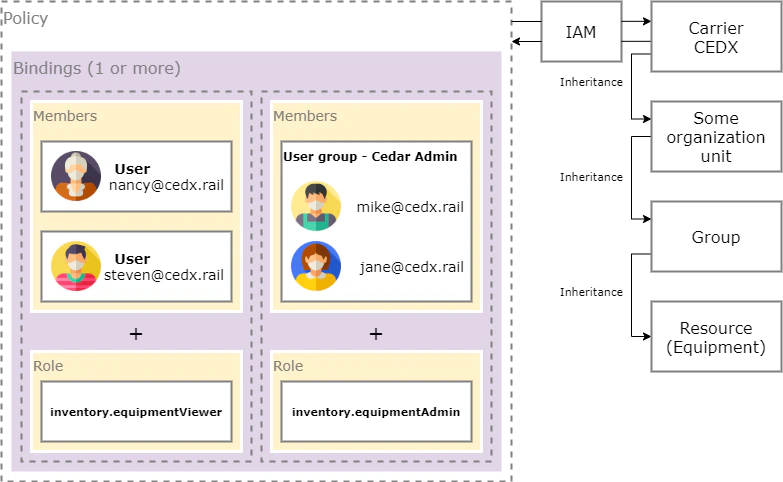
Roles
- Predefined roles (examples):
roles/inventory.equipmentViewerroles/inventory.equipmentAdminroles/inventory.equipmentOrderer
- Feature sets: the columns of the Admin Portal IAM matrix. Each one grants a whole product feature in a single click, and Cedar keeps them current as features evolve, so your roles don’t drift.
- Custom roles: build a role tailored to your org. Prefer composing it from feature-set columns — that way Cedar’s ongoing curation flows through automatically.
Inheritance
Grant at an organization/site/operator level → inherited by terminals, groups/tracks, and resources beneath. Grant at a terminal/group/track or a specific resource for fine‑grained control. A role can also inherit from another role: it picks up every ability of its parents. Cedar uses this so feature sets flow into predefined roles, which means new capabilities Cedar adds to a feature show up in your roles automatically.Manage in the Admin Portal
Roles
View built-in roles and create custom roles
Feature Sets
The columns of the IAM matrix — Cedar curates them so your roles stay current
Bindings
Connect groups to roles (this is how policies are created)
User Groups
Organize users to assign roles at scale