> ## Documentation Index
> Fetch the complete documentation index at: https://docs.cedarai.com/llms.txt
> Use this file to discover all available pages before exploring further.
# Policies & Roles
> Define who can do what on which resource with policies and roles.
This page explains the **conceptual model** of policies and roles. To create and manage roles in practice, use the [Admin Portal Roles page](/user-docs/admin/roles).
## What is a policy?
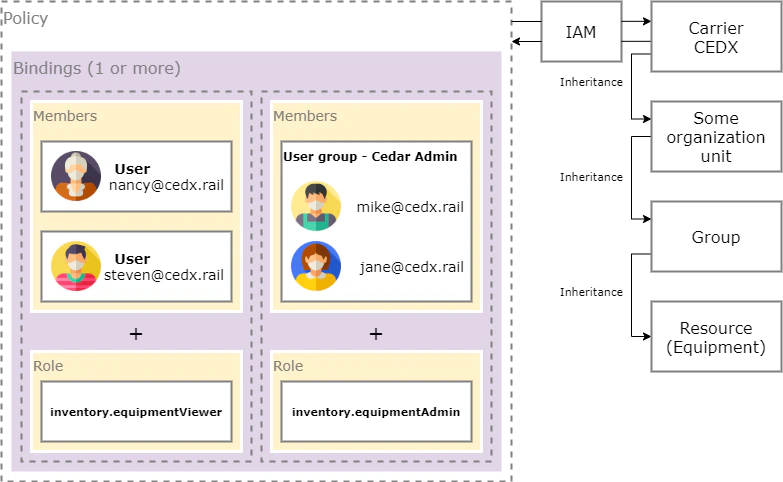
Policies attach to resources and bind members to roles, with optional conditions.
```json theme={null}
{
"bindings": [
{ "role": "roles/inventory.equipmentAdmin", "members": ["group:cedxadmins"] },
{
"role": "roles/inventory.equipmentViewer",
"members": ["user:nancy@cedx.rail", "user:steven@cedx.rail"],
"condition": {
"description": "Only can view BNSF cars",
"expression": "resource.equipmentInitial == 'BNSF'"
}
}
]
}
```
 ## Roles
* Predefined roles (examples):
* `roles/inventory.equipmentViewer`
* `roles/inventory.equipmentAdmin`
* `roles/inventory.equipmentOrderer`
* [Feature sets](/user-docs/iam/feature-sets): the columns of the Admin Portal IAM matrix. Each one grants a whole product feature in a single click, and Cedar keeps them current as features evolve, so your roles don't drift.
* Custom roles: build a role tailored to your org. Prefer composing it from feature-set columns — that way Cedar's ongoing curation flows through automatically.
## Inheritance
Grant at an organization/site/operator level → inherited by terminals, groups/tracks, and resources beneath. Grant at a terminal/group/track or a specific resource for fine‑grained control.
A role can also inherit from another role: it picks up every ability of its parents. Cedar uses this so [feature sets](/user-docs/iam/feature-sets) flow into predefined roles, which means new capabilities Cedar adds to a feature show up in your roles automatically.
## Manage in the Admin Portal
View built-in roles and create custom roles
The columns of the IAM matrix — Cedar curates them so your roles stay current
Connect groups to roles (this is how policies are created)
Organize users to assign roles at scale
## Roles
* Predefined roles (examples):
* `roles/inventory.equipmentViewer`
* `roles/inventory.equipmentAdmin`
* `roles/inventory.equipmentOrderer`
* [Feature sets](/user-docs/iam/feature-sets): the columns of the Admin Portal IAM matrix. Each one grants a whole product feature in a single click, and Cedar keeps them current as features evolve, so your roles don't drift.
* Custom roles: build a role tailored to your org. Prefer composing it from feature-set columns — that way Cedar's ongoing curation flows through automatically.
## Inheritance
Grant at an organization/site/operator level → inherited by terminals, groups/tracks, and resources beneath. Grant at a terminal/group/track or a specific resource for fine‑grained control.
A role can also inherit from another role: it picks up every ability of its parents. Cedar uses this so [feature sets](/user-docs/iam/feature-sets) flow into predefined roles, which means new capabilities Cedar adds to a feature show up in your roles automatically.
## Manage in the Admin Portal
View built-in roles and create custom roles
The columns of the IAM matrix — Cedar curates them so your roles stay current
Connect groups to roles (this is how policies are created)
Organize users to assign roles at scale