> ## Documentation Index
> Fetch the complete documentation index at: https://docs.cedarai.com/llms.txt
> Use this file to discover all available pages before exploring further.
# Microsoft
> Configure Microsoft (Azure AD) SSO for Cedar.AI with IdP- and SP-initiated flows.
## Overview
After registering your organization, all users will transition to the new login method. Notify users in advance to ensure a smooth changeover.
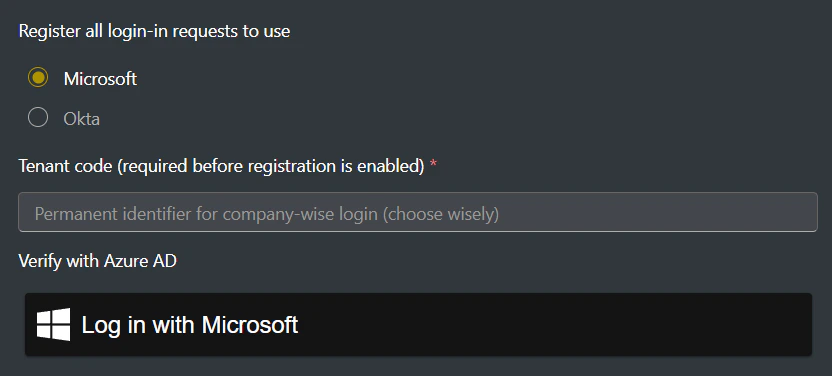
Sign in to ARMS, go to Settings, then select Sign-in options.
Enter your Cedar tenant code (e.g., [https://accounts.cedarai.com/login?tenant=ABCD](https://accounts.cedarai.com/login?tenant=ABCD)).
Select Microsoft as the provider, click Log in with Microsoft, and authenticate with an org-linked user.
 ### Gradual rollout
If you'd like to phase in SSO while keeping a fallback to Cedar identity for select users, enable gradual rollout. See [Gradual rollout](/user-docs/sso/gradual-rollout) for details.
### Tips & potential issues
* Users who need access must belong to the same Azure AD tenant as the initial authenticating user.
* Users must still be assigned to a Cedar user group with sufficient permissions.
Need help? Email [support@cedarai.com](mailto:support@cedarai.com).
### Gradual rollout
If you'd like to phase in SSO while keeping a fallback to Cedar identity for select users, enable gradual rollout. See [Gradual rollout](/user-docs/sso/gradual-rollout) for details.
### Tips & potential issues
* Users who need access must belong to the same Azure AD tenant as the initial authenticating user.
* Users must still be assigned to a Cedar user group with sufficient permissions.
Need help? Email [support@cedarai.com](mailto:support@cedarai.com).