> ## Documentation Index
> Fetch the complete documentation index at: https://docs.cedarai.com/llms.txt
> Use this file to discover all available pages before exploring further.
# Okta
> Configure Okta SSO for Cedar.AI with IdP- and SP-initiated flows.
## Overview
Before starting, register your Okta organization URL with Cedar.AI. Once registered, your users will transition to the new login method—notify users ahead of time.
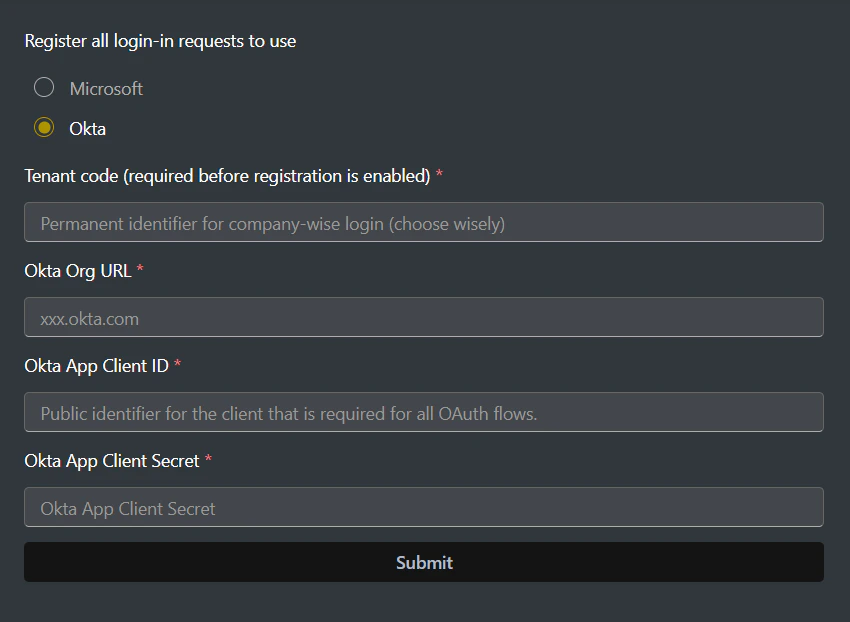
Sign in to ARMS, go to Settings, then select Sign-in options.
Enter your Cedar tenant code. With code ABCD, you can use [https://accounts.cedarai.com/login?tenant=ABCD](https://accounts.cedarai.com/login?tenant=ABCD).
Select Okta as the provider, then enter your organization URL, app client ID, and app client secret. Click Save.
 ### Features we support
* IdP-initiated SSO
* SP-initiated SSO
### Gradual rollout
If you'd like to phase in SSO while keeping a fallback to Cedar identity for select users, enable gradual rollout. See [Gradual rollout](/user-docs/sso/gradual-rollout) for details.
### Tips and troubleshooting
* Ensure the org URL format is correct, e.g.,
### Features we support
* IdP-initiated SSO
* SP-initiated SSO
### Gradual rollout
If you'd like to phase in SSO while keeping a fallback to Cedar identity for select users, enable gradual rollout. See [Gradual rollout](/user-docs/sso/gradual-rollout) for details.
### Tips and troubleshooting
* Ensure the org URL format is correct, e.g., companyname.okta.com.
* Add the Cedar.AI integration to your Okta org and assign users who need access.
* Users must still be assigned to a Cedar user group with sufficient permissions.
Need help? Email [support@cedarai.com](mailto:support@cedarai.com).