

This page explains the conceptual model of policies and roles. To create and manage roles in practice, use the Admin Portal Roles page.
What is a policy?
Policies attach to resources and bind members to roles, with optional conditions.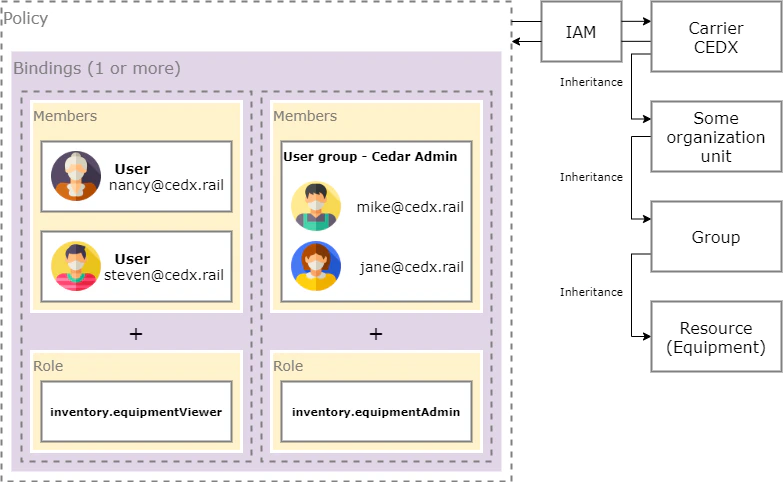
Roles
- Predefined roles (examples):
roles/inventory.equipmentViewerroles/inventory.equipmentAdminroles/inventory.equipmentOrderer
- Custom roles: create a role with the exact permissions your org needs
Inheritance
Grant at an organization/site/operator level → inherited by terminals, groups/tracks, and resources beneath. Grant at a terminal/group/track or a specific resource for fine‑grained control.Manage in the Admin Portal
Roles
View built-in roles and create custom roles
Bindings
Connect groups to roles (this is how policies are created)
User Groups
Organize users to assign roles at scale
Glossary
Quick reference for all terms