Query Data Depot Postgres views, call Cedar APIs from notebooks, or load CDC deliveries into a current-state Delta table.
You can use Cedar data from the Databricks workspace you already run. You don’t need a separate Cedar Databricks account:
Cedar provides the data and the credentials, and Databricks does the compute. The Databricks page in Data Depot
summarizes three ways to connect.
The three Databricks paths in Data Depot, for an EU carrier
Cedar pushes CDC files to your storage, and the Cedar notebook merges them into a Delta table
EU pilot. US on request through Cedar sales
Each card shows a badge with your own status for the carrier selected in the sidebar, so you can see which paths you
can set up:
Badge
What it means
Available
You can set this path up yourself
EU pilot
You can set up CDC delivery, which is a pilot for carriers on Cedar’s EU production environment
View only
You can see what exists, such as views or API clients, but your role can’t create them. The card names the role to ask for
Not available
The path isn’t open to you for this carrier. The card says why, for example a missing role, or that CDC delivery isn’t offered for the carrier yet
Needs a carrier
Select a carrier in the sidebar first
Read the Databricks guide at the top of the page opens this guide. The What Cedar doesn’t do panel next to it
sums up the limits: Cedar never writes to your Delta tables or their logs, doesn’t host a Unity Catalog or run a
Databricks workspace for you, doesn’t use Databricks Partner Connect, and doesn’t share its delivery credential with
Databricks.
Best when you want live data on demand and don’t need to keep a copy.
1
Provision a view
In Data Depot, open Postgres, provision the source you need, and create its database login. See
Postgres views.
2
Store the login in Databricks
Save the username and password in a Databricks secret scope rather than in the notebook.
3
Read the view
Use the host, port, database, and view from the credential. SSL is required.
df = ( spark.read.format("jdbc") .option("url", "jdbc:postgresql://<host>:<port>/<database>?sslmode=require") .option("dbtable", "<view>") # for example cedar_apps.data_depot_waybills_<carrier>_<id> .option("user", dbutils.secrets.get("cedar", "depot-user")) .option("password", dbutils.secrets.get("cedar", "depot-password")) .load())
Each read queries Cedar’s current data. To keep history or a local copy, write the result to your own Delta table on a
schedule. If your workspace must reach Cedar over a private network, see
Private network connectivity. For a copy that runs on your
own SLA rather than Cedar’s Postgres service, use CDC delivery into Delta.
Best when you want a current-state copy of Locations or Waybills in your lakehouse that updates every few
minutes. Data Depot delivers each product as Parquet to your Azure or Amazon S3 landing zone, and the Cedar Databricks
notebook turns one delivery generation into a current-state Delta table in your workspace.
CDC delivery is currently an EU pilot for carriers on Cedar’s EU production environment. We’re happy to make it
available in the US; contact Cedar sales to discuss. Postgres JDBC and API access remain available for every carrier
with Data Depot access.
Do not point Auto Loader directly at the Cedar Parquet folders. Cedar uploads each Parquet object before its
manifest.json. The manifest is the commit signal. Reading the Parquet path directly can process an incomplete or
abandoned batch.
a Databricks workspace with Delta Lake and access to create tables;
a Unity Catalog external location, volume, or other Databricks storage configuration that can read your landing zone;
a live Data Depot CDC delivery; and
separate read access for Databricks. Data Depot stores the credential Cedar uses to write the delivery, but does not share that secret with Databricks.
The initial snapshot is currently delivered as one Parquet object. Contact Cedar before onboarding a very large
carrier dataset so the first snapshot can be checked against the current delivery capacity.
In Data Depot, open Delivery, select Subscribe to CDC, then choose Locations or Waybills and an Azure or S3
destination. See CDC delivery.
2
Wait for the snapshot
Open the subscription and wait until Snapshot delivered has a timestamp. A Live subscription can also have newer change batches.
3
Record the generation details
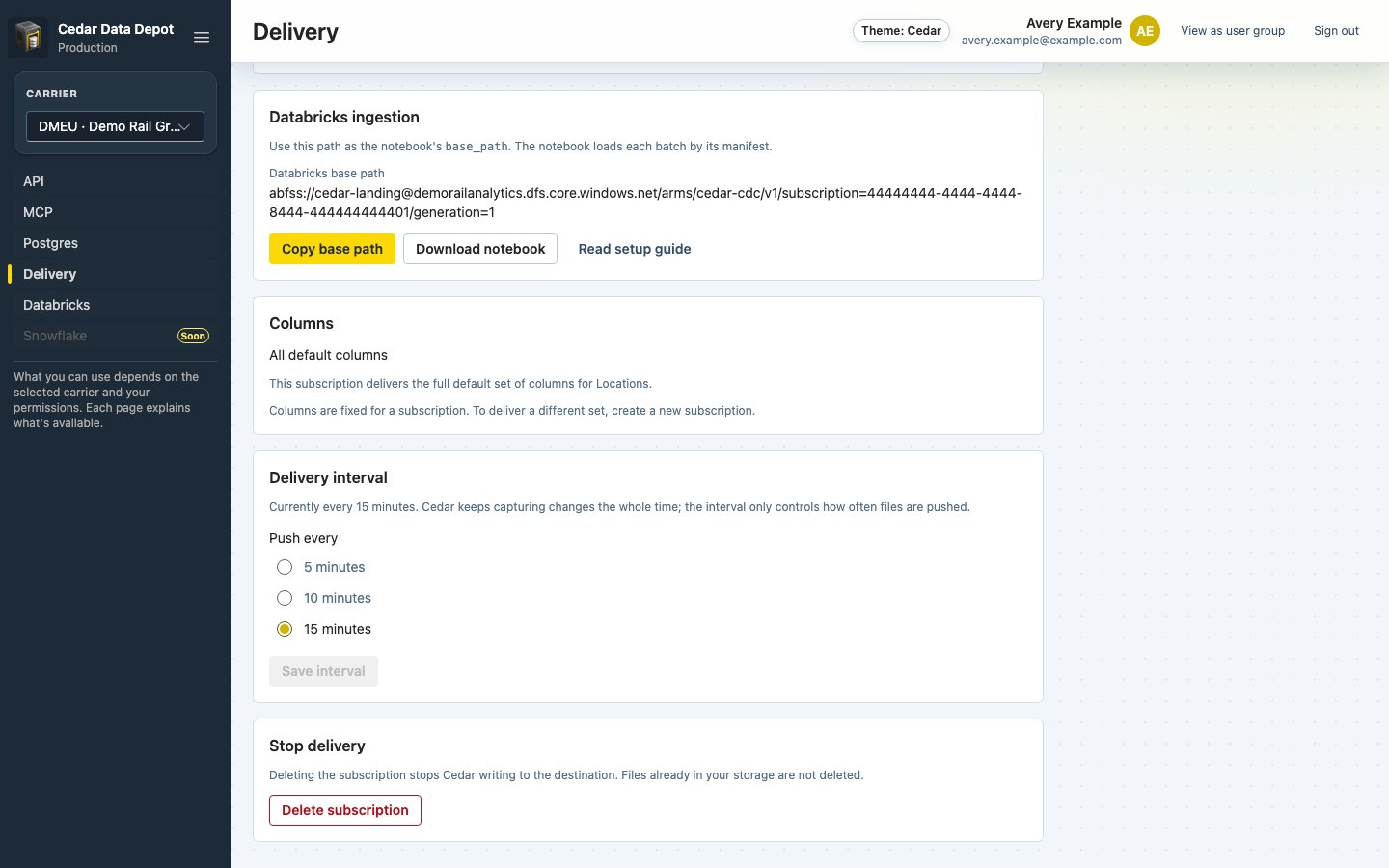
Copy the Databricks base path shown under Databricks ingestion. Data Depot converts Azure container URLs to
abfss:// and includes the destination prefix, subscription ID, and generation. The same panel provides the
notebook download and this guide.
The Databricks ingestion panel on a CDC subscription
The underlying relative generation path has this form:
On the subscription’s page, select Download notebook. You can also download it from the Parquet landing to Delta
card on the Databricks page in Data Depot. In your Databricks workspace, import cedar_product_cdc_to_delta.py as a
source file.The notebook has four parameters:
expand the product fields from payload_json into columns;
find committed change manifests;
ignore already-applied rows from overlapping delivery ranges;
keep the newest event for each product key in a batch; and
update, insert, or delete rows with a sequence-guarded Delta MERGE.
After the first successful run, create a Databricks job using the same parameters. Schedule it at or after the delivery interval selected in Data Depot.The merge is retry-safe. If the target merge succeeds but the apply-state update is interrupted, the next run sees the same batch again and ignores events whose _cedar_sequence is not newer.
A generation pins its schema and selected columns. If you create a new subscription or generation, use a new target table or complete a controlled replacement. Do not point an existing apply-state row at a different generation.
Snapshot manifest not found: Wait until Data Depot shows Snapshot delivered.
Permission denied on the landing zone: Configure Databricks read access to the landing zone. The credential entered in Data Depot is stored for Cedar delivery and is not returned.
Target already exists without Cedar apply state: Retry first. The notebook recovers the state when the table exactly matches the committed snapshot. If it reports a mismatch, choose a new table or verify and remove the incomplete target.
JDBC connection fails: Check that SSL is required in the URL (sslmode=require), that the password hasn’t been reset, and that your workspace can reach the host and port in the credential.
API calls return 401: Check the x-arms-api-key and x-arms-assume-user headers. See API clients.